In this post I’ll walk through how I configured Cloudflare for Families on my ASUS router, why I think it’s a good idea, and what each parameter really means. Setting this up is simple, but the benefits for security, privacy and peace of mind are surprisingly strong.
Summary
Using Cloudflare for Families DNS inside an ASUS router provides a layer of protection against malware and adult content across all devices at home, without installing any software individually.
What is Cloudflare for Families?
Cloudflare offers a free DNS service with built-in filtering. Instead of your ISP’s DNS servers, you point your devices (or better, your whole network) to Cloudflare’s servers.
- 1.1.1.1 is Cloudflare’s fast, private DNS.
- 1.1.1.2 / 1.0.0.2 block malware.
- 1.1.1.3 / 1.0.0.3 block malware + adult content.
By setting this up at router level, every device connected to your Wi-Fi automatically benefits from it.
How to Configure on an ASUS Router
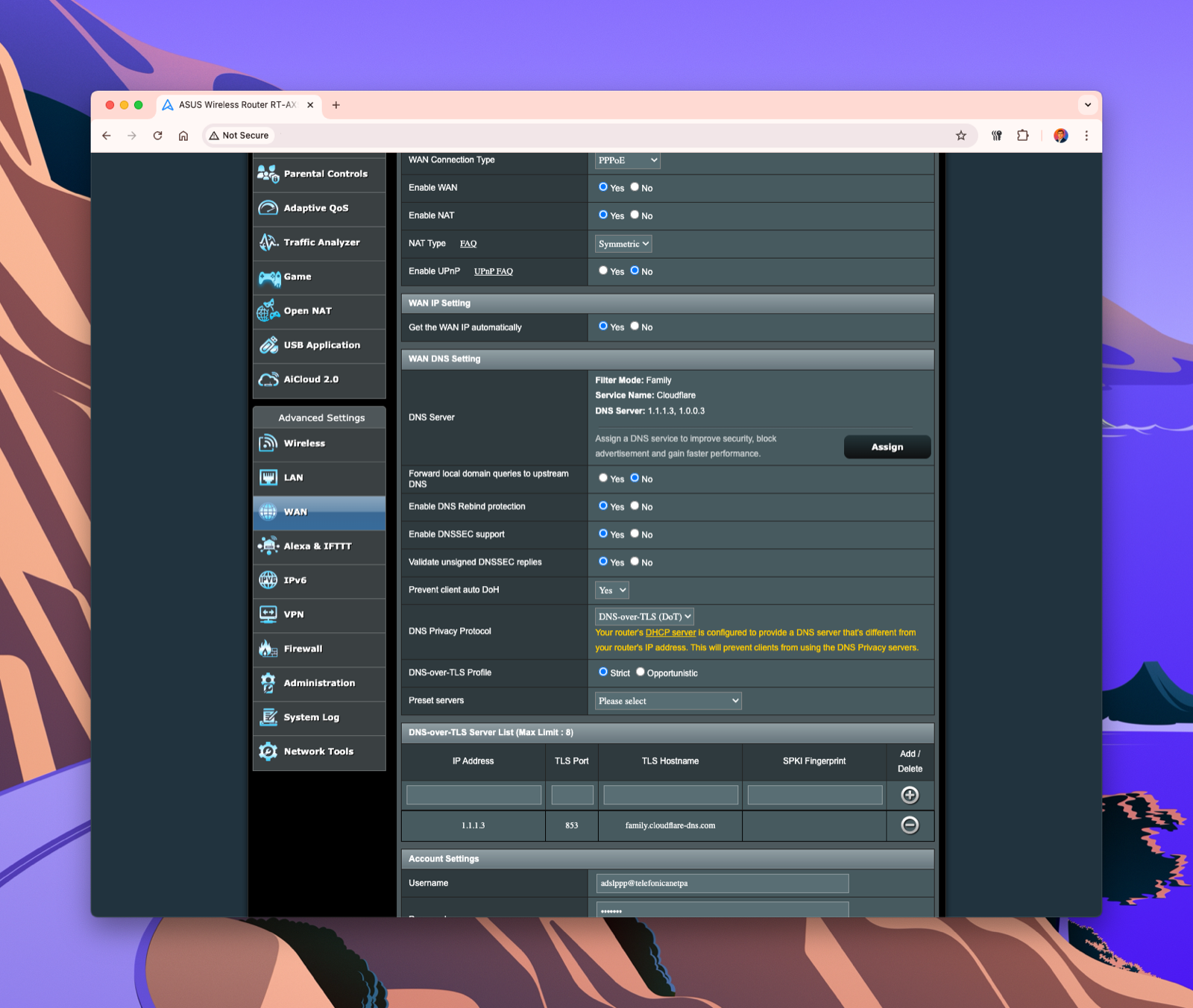
Here’s the configuration I applied (screenshot below):
-
WAN DNS Setting
- Set DNS Server manually to
1.1.1.3and1.0.0.3. - This ensures all requests go through Cloudflare’s Family filter.
- Set DNS Server manually to
-
Forward local domain queries to upstream DNS → Yes
- Lets the router forward even internal lookups to the upstream server, ensuring consistency.
-
Enable DNS Rebind Protection → Yes
- Blocks malicious responses that try to reroute internal queries to external IPs.
-
Enable DNSSEC support & Validate responses → Yes
- Adds cryptographic validation that DNS replies haven’t been tampered with.
-
Prevent client auto DoH → Yes
- Stops clients from bypassing router DNS settings by using their own encrypted DNS.
-
DNS Privacy Protocol → DNS-over-TLS (DoT)
- Encrypts DNS traffic so your ISP can’t snoop on the sites you’re visiting.
-
DNS-over-TLS Profile → Strict
- Forces encryption and validation of the DNS server identity.
-
Server List
- Added
1.1.1.3with hostnamefamily.cloudflare-dns.com. - Port
853is the standard for DoT.
- Added
Benefits I’ve Noticed
- Peace of mind: All devices are automatically protected, even IoT gadgets.
- Performance: Cloudflare is fast; I didn’t notice any slowdown.
- Security baseline: DNS filtering won’t block everything, but it cuts down exposure to phishing and shady content.
- Parental control without hassle: Instead of configuring each child’s device, I set it once on the router.
My Personal Take
For me, configuring Cloudflare for Families was a no-brainer. It’s free, fast, and adds a meaningful extra layer of security and filtering. I like solutions that work at the network edge rather than on each device — they’re easier to maintain and harder to bypass.
This won’t replace full parental control or endpoint protection, but it’s a very strong starting point. If you have an ASUS router, I highly recommend enabling it.